
Unlucid AI Review 2026: Uncensored AI Image and Video Generation
Unlucid AI is an uncensored AI creation platform focused on generating, editing, and animating images and videos. Rather than concentrating on AI chat or virtual companions, the platform puts visual creation at the center of its experience, with tools for AI image generation, video generation, image editing, animation, and creative effects.
One of the main attractions of Unlucid AI is its emphasis on unrestricted creation. The platform offers Enhanced NSFW options alongside its broader collection of image and video generation features, making it particularly relevant to users looking for an NSFW AI or uncensored AI image-generation platform.
Unlucid AI also uses a credit-based system called Gems. Users can claim a limited amount of free Gems daily, while additional Gems can be purchased when more generation capacity is required.
What Is Unlucid AI?
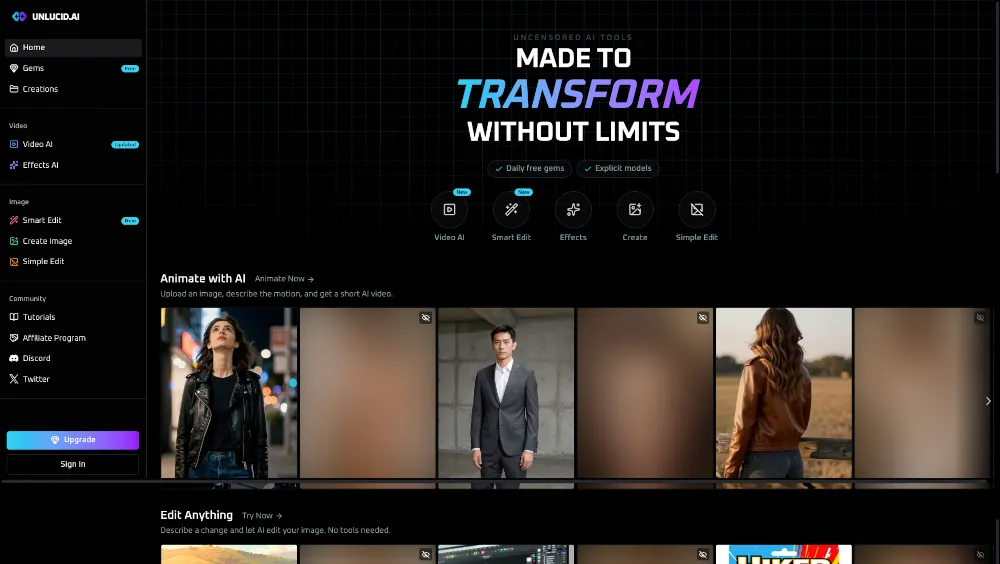
Unlucid AI is an AI-powered visual creation platform designed for generating and modifying images and videos. Its feature set covers several areas, including AI video generation, image generation, image editing, animation effects, prompt enhancement, and image upscaling.
The platform is positioned around unrestricted creative generation and provides tools for both ordinary and NSFW-oriented visual content.
For users primarily interested in still images, Unlucid AI functions as an AI image generator with several predefined artistic styles. For users working with motion content, its Video AI tools can generate and animate videos from prompts and starting images.
This combination makes Unlucid AI broader than a single-purpose image generator. It is closer to an all-in-one visual AI workspace covering image generation, image editing, animation, and video creation.
Unlucid AI Features
Uncensored AI Generation
Unlucid AI's main selling point is its focus on unrestricted AI creation. The platform specifically provides Enhanced NSFW options for users who want greater creative freedom when generating visual content.
This makes it a potentially interesting alternative to conventional AI image platforms where content restrictions can significantly affect the types of prompts users can submit.
Users should still review the platform's current terms and content rules before generating sensitive material, particularly when working with recognizable people or potentially restricted content.
AI Video Generation
Unlucid AI includes Video AI tools for creating and animating video content.
Users can work with text prompts and starting images to create videos, giving them more control over the initial visual direction. The platform also provides an expanding collection of video effects that can be applied to creative projects.
For users looking for an AI video generator rather than a traditional text-only AI service, this is one of Unlucid AI's more important features.
Video Effects
The platform provides more than 15 video effects for transforming images and videos into animated content.
These effects are designed for experimentation and visual transformation rather than traditional professional video editing. They can be useful for turning static images into short-form animated content or creating unusual visual variations.
AI Image Generator
Unlucid AI's Image Generator provides five main artistic styles:
- Realistic
- Cartoon
- 3D Render
- Anime
- Pencil
This gives users several starting points depending on the desired visual style.
The combination of style selection and custom prompting makes the image generator suitable for both photorealistic concepts and more stylized artwork.
Users specifically interested in AI artwork can also explore the broader AI Art Generator category on AIXhub.
AI Image Editing
Unlucid AI is not limited to generating images from scratch. Its editing tools provide several ways to modify existing images with AI.
The available editing capabilities include:
- Removing unwanted objects
- Adding objects
- Replacing objects
- Changing clothing
- Applying AI-powered transformations
- Upscaling images to higher resolution
This makes Unlucid AI useful when the goal is to modify an existing image rather than create an entirely new one.
Prompt Enhancement
The platform also includes a Prompt Enhancer designed to improve user prompts before generation.
This can be useful for users who know what they want visually but do not want to spend significant time manually refining prompts.
For more experienced users, Unlucid AI also provides custom prompting and additional controls that can offer greater control over the generation process.
Seed and Image Reference Controls
Unlucid AI provides image referencing and seed control as part of its generation workflow.
These controls can be particularly useful when users want to maintain greater consistency between generations. Instead of relying entirely on random outputs, users can use references and seeds to guide subsequent generations toward a similar visual direction.
This is especially useful for creating variations of a concept or maintaining visual consistency across multiple images.
Unlucid AI NSFW Capabilities
Unlucid AI is explicitly positioned as an uncensored AI creation platform and includes Enhanced NSFW options.
This makes it different from many mainstream AI image and video generators that impose stricter restrictions on adult-oriented prompts.
Its NSFW-oriented capabilities are primarily relevant to visual generation rather than AI girlfriend or AI roleplay experiences. Users looking specifically for conversational adult characters may find dedicated NSFW AI Chat platforms more appropriate.
For visual content, however, Unlucid AI's combination of image generation, image editing, animation, and uncensored options makes it a more specialized choice.
How to Use Unlucid AI
Getting started with Unlucid AI is relatively straightforward.
1. Open the Creation Tools
Users can access the main creation tools directly from the platform, including:
- Video AI
- Image Generator
- Edit Tools
The platform is available through modern desktop and mobile web browsers, so there is no requirement to install a dedicated desktop application.
2. Choose an Image or Video Workflow
Choose the workflow that matches the content you want to create.
For example, the Image Generator can be used for creating artwork from prompts, while Video AI can be used to animate images or create video content.
3. Enter a Prompt
Describe the desired scene, subject, style, or visual effect using a custom prompt.
Users can also take advantage of the platform's Prompt Enhancer when they want additional assistance refining their instructions.
4. Add an Image Reference When Needed
For supported workflows, an existing image can be used as a reference or starting point.
This can provide additional visual guidance and make it easier to create variations based on an existing concept.
5. Generate and Refine
After generation, users can continue refining their content using the available image editing, animation, effects, and upscaling tools.
The platform's editing capabilities make it possible to modify an existing result instead of repeatedly generating a completely new image.
6. Manage Your Gems
Unlucid AI uses Gems as its generation currency.
Free Gems can be claimed daily, while users who need additional generation capacity can purchase larger Gem bundles.
Unlucid AI Use Cases
Creating AI Images
Unlucid AI can generate images in several different visual styles, including realistic, anime, cartoon, 3D, and pencil-style artwork.
This makes it suitable for experimenting with different aesthetics from the same general concept.
Creating AI Videos
Users can turn prompts and starting images into animated video content.
This can be useful for short-form creative projects, visual experiments, social media content, and other situations where a static image is not enough.
Animating Existing Images
Instead of creating an entire video from scratch, users can start with an existing image and apply animation or video effects.
This provides an accessible way to experiment with AI animation without needing traditional video-editing skills.
Editing Existing Images
The AI editing tools can remove unwanted elements, add or replace objects, or modify clothing.
This makes Unlucid AI useful for image transformation as well as original generation.
Creating NSFW Visual Content
The platform's uncensored positioning and Enhanced NSFW options make it relevant to users looking for adult-oriented AI image and video generation.
For users comparing different services in this space, AIXhub's NSFW AI category provides additional options.
Unlucid AI Pricing
Unlucid AI uses a Gems-based pricing system rather than a traditional unlimited subscription model.
The available paid options include:
| Plan | Price | Included |
|---|---|---|
| 120 Gems | $8.99/month | Up to 120 images, 60 edits, or 12 videos |
| 450 Gems | $29.99/month | Up to 450 images, 225 edits, or 45 videos |
| 1,250 Gems | $59.99/month | Up to 1,250 images, 625 edits, or 125 videos |
The actual number of generations depends on the type of operation being performed, since different image, editing, and video actions consume different amounts of Gems.
The platform also provides free daily Gems, allowing users to test its tools without immediately purchasing a package.
Is Unlucid AI Free?
Unlucid AI provides a free usage option through its daily Gem claim system.
Free users can claim a limited number of Gems each day and use them for supported AI generation and editing features. This makes it possible to test the platform before spending money.
However, users who generate images or videos frequently will likely need additional Gems.
Paid Gem packages increase the available generation capacity and provide access to larger allocations for images, edits, and videos.
One notable advantage is that the platform advertises watermark-free creations, including content generated through its paid usage options.
Unlucid AI Free vs Paid
The main difference between free and paid usage is the amount of generation capacity available.
Free users:
- Can claim free Gems daily
- Can test the platform's AI creation tools
- Have limited generation capacity
- Can use supported image and video features within their available Gem balance
Paid users:
- Can purchase larger Gem allocations
- Can generate substantially more images and videos
- Can perform more AI edits
- Can create content without watermarks
- Have more practical capacity for frequent generation
For occasional experimentation, the free daily Gems may be sufficient. Users creating large volumes of images or videos will likely find the paid Gem bundles more practical.
Does Unlucid AI Add Watermarks?
According to the available product information, Unlucid AI provides watermark-free content generation.
This is a meaningful advantage for creators who want to use generated images or videos without having a platform watermark embedded in the final output.
However, users should still check the platform's current terms regarding commercial use, redistribution, and ownership before using generated content for commercial projects.
Unlucid AI Supported Platforms
Unlucid AI is primarily a web-based service.
It supports:
- Desktop web browsers
- Mobile web browsers
- Mobile-optimized responsive layouts
This means users can access the platform without installing a dedicated native application.
Unlucid AI Payment Methods
The platform supports card-based payments as well as cryptocurrency payments.
Available payment options include cryptocurrency through NOWPayments, with support for cryptocurrencies such as Bitcoin, Ethereum, XRP, SOL, XNO, BNB, DOGE, and others.
Users should verify the payment options displayed at checkout because supported currencies and payment methods can change over time.
Unlucid AI Privacy and Security
Unlucid AI provides a web-based creation environment for generating and editing visual content.
The available information highlights secure cryptocurrency payment processing through NOWPayments and the use of blockchain-based transactions for supported crypto payments.
The platform also promotes watermark-free private creations.
However, privacy claims should not be confused with complete anonymity. Users should review Unlucid AI's current Privacy Policy and Terms before uploading personal photographs, sensitive images, or other content they do not want retained or processed by a third party.
What AI Models Does Unlucid AI Use?
The available product information refers to an upgraded video generation engine and enhanced video models, but does not identify specific third-party model names.
Because of this, it would be inaccurate to attribute Unlucid AI's generation system to a particular model without additional official documentation.
What is clear is that the platform combines AI-powered image generation, video generation, image editing, animation, and enhancement technologies into a single workflow.
Unlucid AI Character and Prompt Customization
Unlucid AI is not primarily an AI character or virtual companion platform, so its customization system is different from services built around persistent AI personalities.
Its customization is focused on visual generation.
Users can work with:
- Custom prompts
- Image references
- Seed control
- Artistic style selection
- Starting images for video generation
- AI-powered editing instructions
These controls provide useful flexibility when users want to create variations while maintaining a degree of visual consistency.
Unlucid AI Media Capabilities
Unlucid AI supports a relatively broad range of visual media workflows.
Images
The platform supports:
- Text-based image generation
- Multiple artistic styles
- Object removal
- Object addition and replacement
- Clothing changes
- Image upscaling
- AI-assisted image editing
Videos
Video capabilities include:
- Text-to-video generation
- Image-to-video workflows
- Image animation
- 15+ video effects
- AI-powered video transformations
The combination of image and video workflows is one of Unlucid AI's stronger selling points.
Unlucid AI Pros and Cons
Pros
- Uncensored AI creation focus
- Enhanced NSFW options
- Image and video generation in one platform
- AI image editing tools
- 15+ video effects
- Five image-generation styles
- Prompt enhancement
- Seed and image-reference controls
- Free daily Gems
- Watermark-free creations
- Works through desktop and mobile browsers
Cons
- Generation capacity is tied to Gems
- Paid usage can become expensive for heavy users
- Specific underlying AI models are not clearly disclosed
- The free tier has limited daily capacity
- It is primarily focused on visual generation rather than AI chat or companion experiences
Unlucid AI vs Other AI Image Generators
Unlucid AI occupies a somewhat different position from mainstream AI art platforms.
Its strongest differentiator is not simply image quality. Instead, it combines uncensored generation, NSFW options, image editing, animation, and video generation within the same platform.
Users who primarily want general-purpose AI artwork may prefer a broader AI Image Generation platform.
Users interested in anime-focused creation can also explore AI Anime Generator services.
On the other hand, users who specifically want fewer content restrictions and a combination of adult-oriented image and video capabilities may find Unlucid AI more relevant.
Unlucid AI FAQ
What is Unlucid AI?
Unlucid AI is an AI-powered platform for creating, editing, and animating images and videos. It focuses on unrestricted AI creation and provides Enhanced NSFW options alongside image generation, video generation, editing, animation effects, and image enhancement tools.
Is Unlucid AI free?
Unlucid AI offers free daily Gems that users can claim and spend on supported AI features. Users who need more generation capacity can purchase additional Gem packages.
Does Unlucid AI support NSFW content?
Yes. Unlucid AI promotes uncensored AI creation and provides Enhanced NSFW options for users who want greater creative freedom.
Does Unlucid AI add watermarks?
The platform advertises watermark-free content generation. Users should still check the latest terms regarding permitted commercial and redistribution uses.
What can I create with Unlucid AI?
Users can create AI-generated images and videos, animate images, apply video effects, edit existing images, remove or replace objects, change clothing, and upscale images.
Does Unlucid AI have an AI video generator?
Yes. Unlucid AI provides Video AI for generating and animating video content using text prompts and starting images. It also offers more than 15 video effects.
How do Gems work on Unlucid AI?
Gems are the platform's usage currency. Free Gems can be claimed daily, while additional Gems can be purchased through paid packages. Different generation and editing operations consume different amounts of Gems.
Can I use Unlucid AI on mobile?
Yes. Unlucid AI can be accessed through mobile web browsers and provides a mobile-optimized responsive interface.
What AI models does Unlucid AI use?
The available information describes an upgraded video generation engine and enhanced video models but does not specify the names of the underlying AI models.
Does Unlucid AI have an AI girlfriend or AI chat feature?
Unlucid AI is primarily a visual creation platform rather than an AI companion or AI chat service. Its main focus is image generation, video generation, animation, and AI-powered editing.
Final Verdict: Is Unlucid AI Worth Trying?
Unlucid AI is worth considering if your main goal is uncensored AI image and video creation rather than AI conversation or virtual companionship.
Its strongest advantage is the combination of several visual AI capabilities in one service. Users can generate images, edit existing content, animate images, create videos, apply visual effects, and upscale results without having to move between multiple specialized platforms.
The availability of Enhanced NSFW options, free daily Gems, and watermark-free generation also makes the platform particularly interesting for users exploring the adult AI creation space.
The main limitation is its credit-based economy. Free Gems are useful for testing the service, but frequent creators will need to purchase additional Gems. In addition, Unlucid AI does not clearly disclose the specific underlying AI models powering its generation systems.
Overall, Unlucid AI is a strong option for users looking for an uncensored, visually focused AI creation platform that combines image generation, image editing, animation, and video generation in one place. For users specifically interested in unrestricted adult-oriented visual creation, it is one of the more relevant platforms to explore alongside other services in AIXhub's NSFW AI and AI Image Generator categories.
